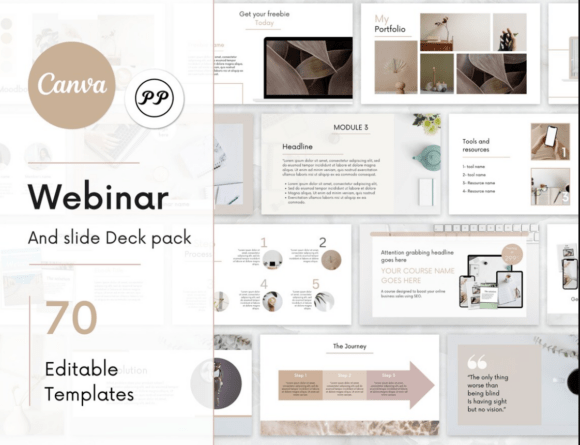
Webinar Canva Template: Create Stunning Webinars and Course Slides with Ease
If you're a creator, educator, or entrepreneur looking to share your knowledge or promote your services, the right visual tools can make all the difference. That’s where the Webinar Canva Template comes in. This all-in-one template pack is designed to help you create professional-looking webinars and course slides without the hassle of starting from scratch.
Whether you're launching a new online course, hosting a live webinar, or simply trying to present your ideas more clearly, this template pack offers a variety of slide types that are easy to edit and visually appealing. From cover slides to case study presentations, everything you need is included in one convenient package.
Why Use the Webinar Canva Template?
The Webinar Canva Template is ideal for anyone who wants to save time while still creating high-quality content. It’s especially useful for those who aren’t design experts but still want their materials to look polished and professional. With just a few clicks, you can customize each slide to match your brand, message, or teaching style.
Imagine you’re preparing a webinar on digital marketing strategies. Instead of spending hours designing slides from scratch, you can use the Webinar Canva Template to quickly build a presentation that includes key points, charts, and visuals. This allows you to focus more on the content and less on the design.
Real-World Use Cases for the Webinar Canva Template
There are countless situations where the Webinar Canva Template can be incredibly useful. Let’s take a look at a few examples:
- Online Course Creators: If you’re building an e-learning course, the template helps you structure your lessons, showcase modules, and highlight key takeaways. The 4 course steps slides and 5 module showcase slides make it easy to break down complex topics into digestible parts.
- Entrepreneurs: When launching a new product or service, the template can be used to create engaging pitch decks or promotional materials. The 6 intro slides and 2 freebies allow you to introduce your offering in a compelling way.
- Coaches and Mentors: Whether you’re offering life coaching, business advice, or skill development, the template helps you craft clear, structured presentations. The testimonials and FAQ slides add credibility and address common concerns.
- Teachers and Educators: For educators, the template can be used to create lesson plans, interactive slides, or student resources. The chart slides and bullet point layouts help explain data and concepts effectively.
What’s Included in the Webinar Canva Template Pack?
The Webinar Canva Template comes with a wide range of slide types to suit different needs. Here’s a breakdown of what you’ll find:
- 4 Cover Slides: Start strong with eye-catching designs that grab attention and set the tone for your webinar or course.
- 6 Intro Slides: Introduce your topic, goals, and audience in a clear and engaging way.
- This Is for You If…: Help potential participants understand who the course or webinar is tailored for.
- This Is Not for You If…: Set expectations and clarify who might not benefit from your content.
- Benefit of Choosing Us: Highlight what makes your course or webinar unique and valuable.
- 2 Course Timeline and Journey Slides: Show the path learners will take through your course.
- 4 Course Steps Slides: Break down the process of learning or achieving a goal.
- 5 Module Showcase and Key Points: Provide a quick overview of each section of your course.
- 9 Chart Slides: Visualize data, progress, or outcomes with professional-looking charts.
- Bullet Points Slides: Keep your content concise and easy to follow.
- 3 Tool and Resources Slides: Share the tools, software, or resources your audience will need.
- Case Study Slide: Present real-world examples to demonstrate the effectiveness of your course or service.
- 6 Course Promotion Slides: Encourage sign-ups and drive engagement with persuasive messaging.
- 2 Freebies: Offer downloadable resources to attract and retain your audience.
- 2 Testimonials and FAQ: Build trust with social proof and answer common questions.
- Mood Board and Portfolio: Showcase your style and past work to reinforce your brand.
- Final Slide and Contacts: End with a strong call to action and provide contact details.
How to Use the Webinar Canva Template
Using the Webinar Canva Template is straightforward, even if you have no prior design experience. Here’s how it works:
- Purchase the Template: After purchasing, you’ll receive a PDF containing an invitation to edit the templates directly in Canva.
- Edit Your Templates: Customize the slides to match your branding, message, or teaching style. You can change colors, fonts, images, and text easily within Canva.
- Download and Use: Once you’re satisfied with your design, download the files and use them for your webinar, course, or presentation.
It’s important to note that a free or Pro Canva account is required to access and edit the templates. The links provided in the PDF instruction file will take you directly to the master template, so make sure to save a copy to your own Canva account before making any changes.
Who Should Consider the Webinar Canva Template?
The Webinar Canva Template is perfect for a wide range of users, including:
- Content Creators: Whether you’re a blogger, podcaster, or YouTuber, this template helps you create engaging visual content for your audience.
- Business Owners: Use it to promote your products, services, or training programs with professional-looking slides.
- Freelancers: Present your skills and portfolio in a clean, organized way that impresses clients.
- Students and Educators: Enhance your lessons, presentations, or study materials with visually appealing designs.
However, it’s not for everyone. If you prefer to design everything manually or don’t have access to Canva, this template may not be the best fit. It also requires some basic understanding of how to navigate Canva to make the most of its features.
Final Thoughts on the Webinar Canva Template
The Webinar Canva Template is a powerful tool that simplifies the process of creating professional-looking webinars and course materials. By offering a wide range of customizable slides, it saves time and effort while ensuring your content looks polished and engaging.
Whether you’re an educator, entrepreneur, or creative professional, this template pack provides the flexibility and structure needed to deliver high-quality presentations. With the right approach, it can become an essential part of your workflow, helping you communicate your ideas more effectively and grow your audience.